Choose a roof shape and finish
Updated 4 min readWorks without an account
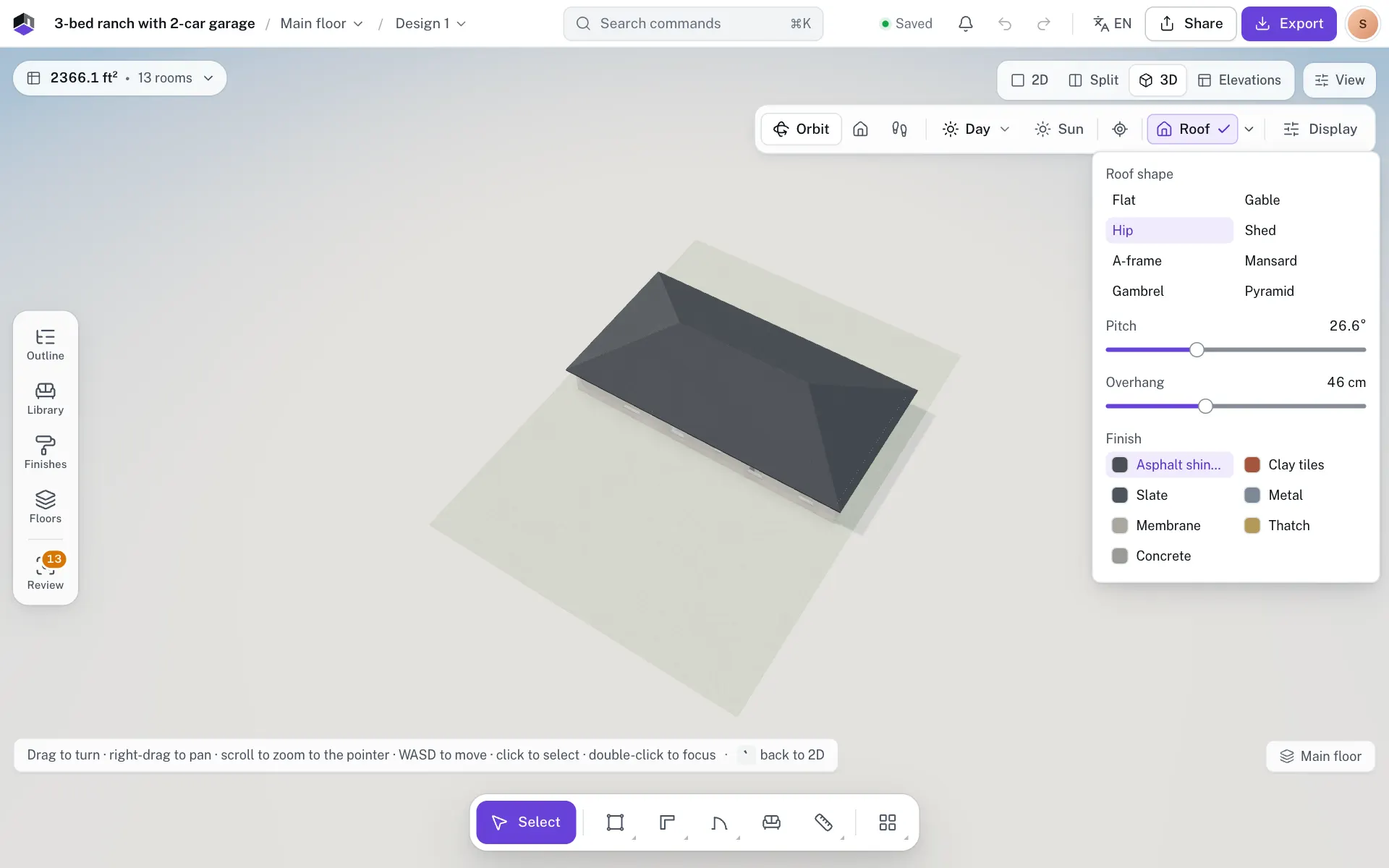
In the 3D view, click Roof to put a roof over the top floor, and open Roof settings beside it to pick one of eight shapes, its pitch, its overhang and one of seven finishes. The roof is saved with the project, so the elevations draw the same one.
Choose a roof
- Step 1: Show the roof
Press 3 for the 3D view, in Orbit. Click Roof on the 3D bar to show a roof over the top floor. Click it again to hide it.
- Step 2: Open Roof settings
Click the arrow beside Roof. Roof settings opens under it, and you can change it with the roof hidden too.
- Step 3: Pick a shape
Under Roof shape, click Flat, Gable, Hip, Shed, A-frame, Mansard, Gambrel or Pyramid. The roof changes as you click.
- Step 4: Set the pitch and overhang
Drag Pitch to set the slope and Overhang to set how far the eaves run past the walls. Both show for every shape except Flat.
- Step 5: Pick a finish
Under Finish, click Asphalt shingles, Clay tiles, Slate, Metal, Membrane, Thatch or Concrete.
The shape, pitch, overhang and finish are saved with the project, so the elevations and their PDFs draw the same roof. They are project settings, so Undo does not step back through them. Whether the 3D view shows the roof is a setting of this browser, and it starts off.
The roof shapes
| Shape | What it looks like |
|---|---|
| Flat | Follows the outline of the top floor, with a low parapet round the edge. It has only Finish. |
| Gable | Two slopes meet at a ridge, with a triangle of wall at each end. |
| Hip | Slopes on all four sides at the same pitch. |
| Shed | One slope rises across the building, and the wall on its high side goes up to meet it. |
| A-frame | A gable at least 50° steep, with no overhang past the end walls. A lower Pitch draws it at 50°. |
| Mansard | A steep slope on all four sides, then a shallow hip on top at half the Pitch. |
| Gambrel | Two slopes on each side, a steep one low down and then Pitch up to the ridge, with a wall at each end like a barn. |
| Pyramid | Four triangles meet at one point over the middle. On a building that is not square, it is drawn as a hip roof. |
- A gable, shed, A-frame or gambrel ridge runs along the longer side of the top floor.
- When the top floor is not a rectangle, every shape except Flat covers its bounding box, and Roof settings says so. A flat roof follows the outline.
- Mansard eaves, and a gambrel’s side eaves, reach at most 25 cm past the walls, whatever the Overhang, so they do not drop over the windows. A gambrel’s ends use the full Overhang.
Pitch, overhang and finish
| Field | What it does | Range | Default |
|---|---|---|---|
| Roof shape | One of the eight shapes above. | Flat | |
| Pitch | The slope, in degrees. It and the building’s width set the ridge height. | 10° to 60°, in 1° steps | 30° |
| Overhang | How far the eaves run out past the walls on every side. They drop on the same slope. Always in cm. | 0 to 120 cm, in 5 cm steps | 40 cm |
| Finish | The roof covering, in 3D and in the elevations. | Asphalt shingles, Clay tiles, Slate, Metal, Membrane, Thatch, Concrete | Membrane |
How tall the roof is
There is no height field. The eaves sit on the tallest wall of the top floor. On a gable or hip roof the ridge rises above them by half the building’s width across the ridge times the tangent of the pitch. At 30°, a house 8 m wide gets a ridge 2.3 m above the wall tops. To lift the whole roof, raise the top floor’s walls or a storey below it; see Heights and levels.
| Slope (rise in 12) | Pitch |
|---|---|
| 4:12 | 18.4° |
| 6:12 | 26.6° |
| 8:12 | 33.7° |
| 12:12 | 45° |
The slider moves in whole degrees, so pick the nearest one, such as 27° for 6:12. Three US templates carry an exact 6:12 gable roof, which reads 26.6°: the 3-bed ranch with 2-car garage, the 3-bed ranch with finished basement and the 4-bed two-story.
Separate buildings
When the top floor has separate buildings, such as a house and a studio whose walls do not touch, each gets its own roof with these settings. FloorGen AI or a connected agent can give one building a different shape, pitch or finish, or turn its ridge the other way. Roof settings then changes the buildings that have no roof of their own.
Questions
How do I make the roof taller?
Raise Pitch in Roof settings; there is no height field. A wider building gets a taller roof at the same pitch. To lift the whole roof, raise the top floor’s walls. A flat roof has no slope to change.
Why does my pitched roof cover a rectangle?
When the top floor is not rectangular, every shape except Flat covers its bounding box. A flat roof follows the outline.
Why can’t I see the roof?
Roof shows only in Orbit. Pick Orbit on the 3D bar, then click Roof.
Which roof does the elevation draw?
The one saved with the project, so it matches the 3D view, even while Roof is off in 3D.